

Reliable AB-210 Dumps Questions Available as Web-Based Practice Test Engine
Correct and Up-to-date Microsoft AB-210 BrainDumps
NEW QUESTION # 21
A sales manager wants to set up goals for all salespeople. The goal measurement is based on the total outgoing calls finished each year. The goals for the fiscal year are based on a calendar year, January- December.
You need to create the rollup query for the goal metrics.
Which option should you select? To answer, select the appropriate options in the answer area.
NOTE: Each correct selection is worth one point.
Answer:
Explanation: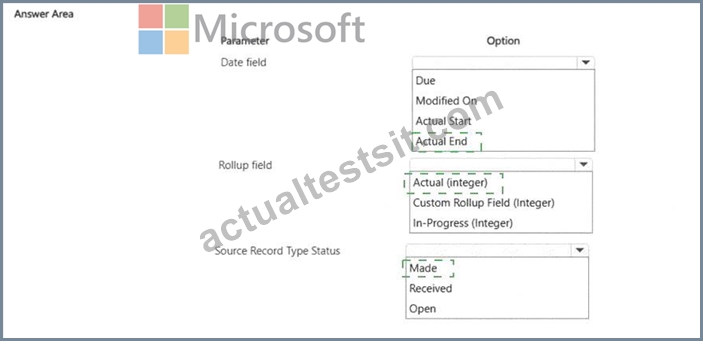
Explanation:
The correct date field is Actual End because the goal is based on calls that are finished during the calendar year. For the Phone Call table, Microsoft defines Actual End as the actual end date and time of the phone call, which is the proper date to evaluate whether the completed call falls within the January-December goal period.
The correct rollup field is Actual (Integer) because the goal measures the number of outgoing calls, not revenue or another money-based amount. Microsoft's goal metric guidance explains that goal metrics can use count/integer values, and specifically gives sales calls made by a salesperson as an example of an integer goal metric. The actual integer field represents the achieved count as of the latest rollup calculation.
The correct source record type status is Made because the requirement is for outgoing calls that were completed. Microsoft's Phone Call status reason options include Open , Made , Canceled , and Received ;
"Made" represents completed outgoing phone calls, while "Received" represents completed incoming calls.
Therefore, the rollup must count Phone Call records with status Made , using Actual End as the date boundary and Actual (Integer) as the accumulated value.
References/topics: Dynamics 365 Sales goals; goal metrics; rollup fields; phone call activity status; Actual End date; completed outgoing call tracking.
NEW QUESTION # 22
Hotspot Question
A company plans to implement AI capabilities in Dynamics 365 Sales to automate multiple seller workflow tasks.
The company needs to assign AI capabilities that provide the following:
- Must identify contextual insights about accounts before outreach.
- Must generate overviews of opportunity activities and emails.
- Must evaluate and qualify incoming leads automatically.
You need to match the appropriate AI capability to each seller workflow task.
Which configuration should you use? To answer, select the appropriate options in the answer area.
NOTE: Each correct selection is worth one point.
Answer:
Explanation:
Explanation:
The correct capability for identifying contextual account insights before outreach is Sales Research Agent. This agent is designed to help sellers and sales leaders gather AI-generated research about customers, prospects, and sales targets, which directly supports pre-outreach preparation and account intelligence. It is not Conversation Intelligence, because Conversation Intelligence analyzes calls and seller-customer conversations after or during interactions, not account research before outreach.
For generating an opportunity overview, the correct capability is Copilot summarization. Copilot in Dynamics 365 Sales can generate quick summaries of opportunity and lead records, including relevant activity and communication context, so sellers can quickly understand the state of a deal without manually reviewing all historical interactions.
For automating lead processing, the correct capability is Sales Qualification Agent. This agent evaluates incoming leads against qualification criteria, researches lead context, determines fit, and can qualify or disqualify leads according to configured business rules. Predictive lead scoring prioritizes leads by likelihood to convert, but it does not perform autonomous lead qualification processing. Sales Close Agent is focused on opportunity/deal execution, not lead qualification.
NEW QUESTION # 23
You configure the product catalog for a company that sells coffee machines and accessories.
The company requires that new products be structured and made available to the sales team. The company also needs to group multiple products under a single parent item. Sellers need to be able to sell coffee machines, filters, and grinders together.
You need to determine the correct action for each catalog requirement.
Which configuration or action should be applied? To answer, move the appropriate configurations or actions to the correct requirements. You may use each configuration or action once, more than once, or not at all. You may need to move the split bar between panes or scroll to view content.
NOTE: Each correct selection is worth one point.
Answer:
Explanation:
Explanation:
Requirement
Configuration or action
Make a product available for selling
Publish product
Organize related products so they inherit shared attributes
Product family
Create a combined offering of several products
Bundle
The correct action to make a product available for selling is Publish product . In Dynamics 365 Sales, products, families, and bundles are typically created or revised before being published. Microsoft states that publishing makes products available for selling, and sellers can choose only published products and bundles when creating sales records such as opportunities and quotes.
To organize related products so they inherit shared attributes, use a Product family . Product families provide the hierarchy used to classify and manage similar products. Microsoft's product catalog documentation explains that a product family can contain child product families, products, and bundles in a hierarchy, and the parent family is used to structure related catalog items.
To sell coffee machines, filters, and grinders together, configure a Bundle . A bundle is the correct component when several products are sold together as one combined offering. Microsoft's product catalog guidance distinguishes bundles from product families: families organize related catalog items, while bundles package multiple sellable products together. Currency is not used here because it supports pricing localization and monetary values, not catalog structure, publication, or combined product offerings.
References/topics: Product catalog lifecycle; publish product; product families; product bundles; Dynamics 365 Sales product catalog configuration.
NEW QUESTION # 24
A company is using Dynamics 365 Sales.
The company wants sellers to use a repeatable sequence for opportunities. The company has the following requirements for the opportunity stages:
* Must define the flow of work sellers must complete before closing an opportunity.
* Must guide sellers through data entry at each stage.
* Must report on the business process flow execution.
* Must ensure background process occurs after stage changes.
You need to configure a solution for each requirement.
Which configuration should you use for each requirement? To answer, move the appropriate configurations to the correct requirements. You may use each configuration once, more than once, or not at all. You may need to move the split bar between panes or scroll to view content.
NOTE: Each correct selection is worth one point.
Answer:
Explanation:
Explanation:
Requirement
Configuration
Define stages sellers must complete before closing opportunity
Business process flow stages
Guide sellers through required fields during each stage
Required step fields
Report on business process flow execution
Active Opportunity Sales Process view
Ensure automation occurs after stage changes
Power Automate cloud flow
The correct solution is based on the Opportunity Sales Process business process flow . Business process flow stages define the sequence of work sellers must follow, such as qualifying, developing, proposing, and closing an opportunity. These stages give sellers a repeatable, controlled path through the opportunity lifecycle and align execution with the organization's sales methodology.
Required step fields are used to guide data entry inside each stage. A business process flow stage can contain steps mapped to Dataverse columns, and marking a step as required ensures sellers complete key information before moving forward. This directly supports consistent opportunity data capture.
For reporting on business process flow execution, use the Active Opportunity Sales Process view . Business process flows have process instance records that can be viewed and reported on, allowing managers to monitor active process execution, stage progress, and process usage.
To run background logic after stage changes, use a Power Automate cloud flow . A cloud flow can react to Dataverse changes and perform automation such as notifications, updates, approvals, or follow-up task creation after a stage transition occurs.
References/topics: Business process flows; Opportunity Sales Process; required BPF steps; process instance reporting; Power Automate automation after Dataverse stage changes.
NEW QUESTION # 25
Drag and Drop Question
A company is using Dynamics 365 Sales.
The company wants sellers to use a repeatable sequence for opportunities. The company has the following requirements for the opportunity stages:
- Must define the flow of work sellers must complete before closing an
opportunity.
- Must guide sellers through data entry at each stage.
- Must report on the business process flow execution.
- Must ensure background process occurs after stage changes.
You need to configure a solution for each requirement.
Which configuration should you use for each requirement? To answer, move the appropriate configurations to the correct requirements. You may use each configuration once, more than once, or not at all. You may need to move the split bar between panes or scroll to view content.
NOTE: Each correct selection is worth one point.
Answer:
Explanation:
Explanation:
The correct solution is based on the Opportunity Sales Process business process flow. Business process flow stages define the sequence of work sellers must follow, such as qualifying, developing, proposing, and closing an opportunity. These stages give sellers a repeatable, controlled path through the opportunity lifecycle and align execution with the organization's sales methodology.
Required step fields are used to guide data entry inside each stage. A business process flow stage can contain steps mapped to Dataverse columns, and marking a step as required ensures sellers complete key information before moving forward. This directly supports consistent opportunity data capture.
For reporting on business process flow execution, use the Active Opportunity Sales Process view. Business process flows have process instance records that can be viewed and reported on, allowing managers to monitor active process execution, stage progress, and process usage.
To run background logic after stage changes, use a Power Automate cloud flow. A cloud flow can react to Dataverse changes and perform automation such as notifications, updates, approvals, or follow-up task creation after a stage transition occurs.
NEW QUESTION # 26
You are creating a pricing list in Dynamics 365 Sales. All prices must end in $.98.
You need to select the function that establishes this pricing requirement.
What should you use?
- A. Pricing Method
- B. Percentage
- C. Rounding Amount
- D. Rounding Policy
Answer: C
Explanation:
The correct answer is Rounding Amount . In Dynamics 365 Sales price list item configuration, rounding is used when calculated prices must follow a specific price-ending convention, such as ending in .98 or .99 .
Microsoft's pricing guidance explains that price list items can use rounding behavior so calculated product prices can be rounded and made to end in a specified amount, such as 99 cents. The value that defines the exact ending amount is the Rounding Amount . Therefore, to make all calculated prices end in $.98 , the administrator would configure the rounding amount as 0.98 .
Rounding Policy is not precise enough by itself. It controls the direction of rounding, such as rounding up, down, or to the nearest value, but it does not define the exact cents-ending requirement. Pricing Method determines how the price is calculated, such as a currency amount, percentage of list price, markup, or margin. Percentage is used when a percentage-based pricing method is selected, but it does not force prices to end in $.98 . The requirement is explicitly about the final rounded price ending, so Rounding Amount is the correct function.
References/topics: Price lists; price list items; rounding amount; rounding policy; Dynamics 365 Sales product pricing.
NEW QUESTION # 27
Note: This question is part of a series of questions that present the same scenario. Each question in the series contains a unique solution that might meet the stated goals. Some question sets might have more than one correct solution, while others might not have a correct solution.
After you answer a question in this section, you will NOT be able to return to it. As a result, these questions will not appear on the review screen.
You are deploying AI agents for a company using Microsoft Dynamics 365 Sales.
The company wants to ensure that AI usage is tracked and billed monthly.
The company requires that AI billing uses pre-paid credits.
You need to configure the billing based on the requirements.
Solution: Configure capacity overages to the billing plan on the Dynamics 365 Sales environment.
Does the solution meet the goal?
- A. No
- B. Yes
Answer: A
Explanation:
The solution does not meet the goal. The requirement is explicit: AI billing must use pre-paid credits .
Microsoft's Dynamics 365 Sales billing guidance separates Copilot and agent billing into two models:
prepaid capacity and pay-as-you-go . Prepaid capacity uses Copilot Studio message pack subscriptions that are purchased in advance, while pay-as-you-go bills for the actual number of messages consumed during the month.
Configuring capacity overages to a billing plan is not the prepaid-credit model. Overages are tied to consumption beyond allocated capacity and are handled through billing-plan/pay-as-you-go behavior. That conflicts with the requirement to use pre-purchased credits. For prepaid billing, the correct approach is to purchase Copilot Studio message packs or capacity packs and assign that prepaid capacity to the Dynamics
365/Power Platform environment. Microsoft's Power Platform capacity guidance states that prepaid capacity can be assigned to environments, and when prepaid capacity is exhausted, administrators must reallocate capacity, purchase more credits, or enable pay-as-you-go billing.
Therefore, configuring overages may support monthly usage billing, but it does not satisfy the stated requirement that billing must use prepaid credits.
References/topics: Dynamics 365 Sales consumption-based billing; prepaid capacity; Copilot Studio message packs; Copilot credit capacity; pay-as-you-go overage handling.
NEW QUESTION # 28
Your company is preparing sellers for complex enterprise opportunities.
The company wants sellers to gather relevant insights before initial account engagement.
You need to determine when using the Sales Research Agent is appropriate.
In which two scenarios are you able to use the Sales Research Agent? Each correct answer is a complete solution. Choose two.
NOTE: Each correct selection is worth one point.
- A. Analyze internal data sources only without querying the web if Bing search consent is disabled.
- B. Engage automatically through emails to request information to allow you to research and understand the account.
- C. Analyze business performance by asking questions and receiving an AI-generated blueprint and then iterating using follow-up questions on the canvas.
- D. Update opportunities with the results of the research that it does, including updating risk and importance criteria.
Answer: A,C
Explanation:
The correct scenarios are B and C. Sales Research Agent is designed for research and analysis, not autonomous record updates or email engagement. Microsoft describes the agent as an AI- powered research canvas that lets users solve complex business questions through natural language, generate research blueprints, review sales-data insights, and ask follow-up questions to refine the analysis. It can use Dynamics 365 Sales data, uploaded offline files such as CSV, Excel, or PDF, and connected data sources to support pipeline exploration and sales operations analysis.
Option B is correct because Microsoft states that Sales Research Agent may use Bing Search only when the Bing search consent setting is enabled. When Bing search is disabled, the agent operates only on internal data sources that the user already has permission to access. Option C is also correct because the agent generates a research blueprint with visualizations and a text overview, and users can continue iterating by asking follow-up questions or changing visualizations on the canvas.
NEW QUESTION # 29
A company is implementing the Dynamics 365 Sales mobile app.
The company requires setup of several push notifications for sellers who use the app.
You need to create the push notifications.
Which feature should you use?
- A. Plug-in
- B. Cloud flow
- C. Classic flow
Answer: B
Explanation:
The correct feature is Cloud flow . Dynamics 365 Sales mobile app push notifications are created through Power Automate by using the Send push notification V2 action. Microsoft's Sales mobile documentation states that the Dynamics 365 Sales mobile app supports push notifications created with the Send push notification V2 action, where the mobile app is set to Sales , the target app is selected, recipients are defined, and the notification can open a specific table record when selected.
Power Automate documentation also describes the creation process as a notification from a flow : go to Power Automate, create an automated flow, choose a trigger such as Microsoft Dataverse, then add the Send push notification V2 action. That matches the requirement to configure several seller notifications for the Sales mobile app. Classic flow is not the correct answer because modern mobile notification automation should be implemented with Power Automate cloud flows, not legacy/classic workflow patterns. Plug-in is also wrong because plug-ins are server-side Dataverse extensions for custom business logic; they are not the standard no- code configuration mechanism for mobile push notifications.
References/topics: Dynamics 365 Sales mobile app; custom push notifications; Power Automate cloud flows; Send push notification V2; Dataverse-triggered seller automation.
NEW QUESTION # 30
You are implementing a sales automation solution for a company.
The sales team wants to automate actions when new leads are created or when opportunities reach specific milestones. The company plans to use Power Automate to automate these actions.
The automation must meet the following requirements:
. Automatically notify a manager when a high-value opportunity is created.
. Validate the products with an external ERP system every Sunday.
. Display a guided lead qualification interface on the lead form.
. Update an external ERP system when an opportunity is won.
You need to identify which automation type to use for each requirement.
Which automation type should you use? To answer, move the appropriate automation types to the correct requirements. You may use each automation type once, more than once, or not at all. You may need to move the split bar between panes or scroll to view content.
NOTE: Each correct selection is worth one point.
Answer:
Explanation:
Explanation:
Requirement
Automation type
Notify a manager when a high-value opportunity is created
Power Automate automated cloud flow
Validate the products with an external ERP system every Sunday
Power Automate scheduled cloud flow
Display a guided lead qualification interface on the lead form
Business process flow
Update an external ERP system when an opportunity is won
Power Automate automated cloud flow
A Power Automate automated cloud flow is the correct automation type when work must run automatically after a business event occurs. Microsoft describes cloud flows as flows that can perform actions automatically after an event triggers them, such as sending a notification after a triggering event occurs. Therefore, notifying a manager when a high-value opportunity is created and updating an external ERP system when an opportunity is won are both event-driven scenarios, so they should use automated cloud flows with Dataverse triggers.
A Power Automate scheduled cloud flow is correct for validating products with an external ERP system every Sunday. Microsoft states that a scheduled cloud flow runs at a specific time or recurring schedule, such as daily or weekly, and uses a recurrence trigger. That directly matches the weekly Sunday validation requirement.
A Business process flow is correct for displaying a guided lead qualification interface on the lead form.
Business process flows provide a streamlined user experience that guides users through defined processes, and Dynamics 365 Sales documentation explains that stages and steps display in a control at the top of a form.
Instant cloud flow is not used because none of the requirements ask for a manually triggered user action.
References/topics: Power Automate automated cloud flows; scheduled cloud flows; Dataverse triggers; Business process flows; Dynamics 365 Sales automation and extensibility.
NEW QUESTION # 31
A company uses Dynamics 365 Sales to manage opportunities using a custom form.
Sellers spend significant time manually reviewing information about opportunities before contacting customers.
You need to reduce the time required for reviewing opportunities.
What should you add to the form?
- A. Health score
- B. Up next
- C. Predictive opportunity scoring
- D. Timeline highlights
- E. Opportunity summary
Answer: E
Explanation:
The correct answer is Opportunity summary. The requirement is not to score the opportunity, show the next activity, or display health indicators; it is to reduce the seller's manual review effort before contacting the customer. Microsoft's Copilot capability for Dynamics 365 Sales provides AI-generated summaries for opportunity records so sellers can quickly understand key deal context, related activities, emails, and important history without reading the full timeline manually.
Microsoft specifically states that Copilot record summarization generates concise summaries of key information from sales records such as opportunities, leads, and accounts.
Because the company uses a custom opportunity form, the opportunity summary widget must be added to that form. Microsoft's implementation guidance explicitly flags custom opportunity forms and asks whether the opportunity summary widget has been added, and the Copilot summary documentation notes that the opportunity summary widget is available by default on the standard form but must be added to custom forms. Up next guides sellers to the next activity, Health score and Predictive opportunity scoring evaluate opportunity risk or likelihood, and Timeline highlights is narrower than the full AI-generated opportunity overview.
NEW QUESTION # 32
A company uses Dynamics 365 Sales with the Sales Research Agent enabled. Sellers review the research canvas before planning outreach to customers.
You generate a Sales Research Agent blueprint on the research canvas.
You need to update a single component in the blueprint.
What should you do?
- A. Update a single block in the canvas.
- B. Refresh the report in the Dynamics 365 AI Optimization hub.
- C. Regenerate the blueprint.
- D. Refresh the blueprint.
Answer: A
Explanation:
The correct action is Update a single block in the canvas . In Sales Research Agent, the research canvas generates a blueprint that contains research findings, visualizations, and blocks of insight. Microsoft states that users can interact with visualizations through the AI cursor, ask follow-up questions, and then choose whether to update the existing block or generate a new blueprint. If Update block is selected, the existing block is updated with the new information; if Generate new blueprint is selected, the agent creates a new blueprint and adds a journey line.
This distinction matters. The requirement is to update one component , not rebuild the full blueprint.
Regenerate the blueprint or Refresh the blueprint would affect the broader blueprint output: Microsoft documents refresh/regenerate as actions for using latest data or producing new visualizations and insights, not for targeted single-block editing. The Dynamics 365 AI Optimization hub is unrelated to editing individual research canvas blocks.
References/topics: Sales Research Agent; research canvas; blueprint blocks; AI cursor; update block; intelligent opportunity research.
NEW QUESTION # 33
You need to configure the new lead qualification experience in Dynamics 365 Sales for field sellers.
What should you configure?
- A. Enable auto-create records for newly qualified leads.
- B. Allow Copilot to summarize key info.
- C. Set related record creation to Seller.
- D. Set related record creation to Automatic.
- E. Use the Lead to Opportunity Business Process Flow.
Answer: C
Explanation:
The correct configuration is to set related record creation to Seller. The case study states that sales leadership requires flexibility in how leads are converted: inside sales need automatic opportunity creation, but field sellers need the option to manually decide whether an opportunity should be created when a lead is qualified.
In the new lead qualification experience, Dynamics 365 Sales lets administrators control whether account, contact, and opportunity records are created automatically during lead qualification or whether sellers are prompted to choose which related records to create. Microsoft's lead qualification guidance confirms that when automatic creation is not enabled, sellers are prompted to select which records should be created during qualification.
Option B and option E are wrong for field sellers because automatic creation would remove the manual decision point required by the case study. Option C is relevant to guiding sellers through sales stages, but the existing Lead to Opportunity Business Process Flow does not control whether related records are automatically created when a lead is qualified. Option D is unrelated because Copilot summaries help sellers review record information; they do not configure lead conversion behavior. Therefore, the required configuration for field sellers is Seller-controlled related record creation.
References/topics: Lead qualification experience; lead-to-opportunity conversion; related account, contact, and opportunity creation; Dynamics 365 Sales lead management.
NEW QUESTION # 34
A company plans to deploy a Dynamics 365 Sales Hub app.
An administrator creates a Power Platform environment with the following configuration:
- The environment does not have a database.
- The environment is a sandbox environment.
- Access to the environment is restricted to a security group.
- The administrator has the System Administrator role.
You need to ensure that the administrator can deploy Dynamics 365 Sales.
Which two actions should you perform? Each correct answer presents part of the solution.
Choose two.
NOTE: Each correct selection is worth one point.
- A. Assign a Dynamics 365 Sales enterprise license to the administrator role.
- B. Remove the security group restriction.
- C. Add Dataverse and enable Dynamics 365 apps.
- D. Create a new environment.
- E. Enable server-side synchronization.
Answer: A,C
Explanation:
The administrator must have both the correct license and an environment that supports Dynamics
365 apps. Microsoft states that when creating a production or sandbox Power Platform environment with a Dataverse database, administrators can add Dynamics 365 apps such as Dynamics 365 Sales, but they must select Enable Dynamics 365 apps during database provisioning. Microsoft also states that a valid Dynamics 365 license is required to enable Dynamics 365 apps.
Therefore, the administrator must be assigned a Dynamics 365 Sales Enterprise license, and the environment must have Dataverse added with Dynamics 365 apps enabled. After the Sales license is available, Dynamics 365 Sales apps such as Sales Hub can be installed from the Power Platform admin center under the environment's Dynamics 365 apps resources.
NEW QUESTION # 35
The remote sales workforce of your organization has been using the integrated Teams chat to collaborate internally. To save time, you indicate to the sales leader that suggested contacts can be displayed when a seller starts a new connected chat.
The sales leader asked you to configure the ability to use suggested contacts.
Which three rules does Dynamics 365 provide as default options to use for suggesting contacts?
Each correct answer presents a complete solution. Choose three.
NOTE: Each correct selection is worth one point.
- A. The Record Owner of the initiating record.
- B. The system user who updated a timeline activity on the initiating record.
- C. The Created By of the initiating record.
- D. The Last Modified By of the initiating record.
- E. The Record Owner of your linked business unit.
- F. The user assigned as your manager on your system user record.
Answer: A,C,F
Explanation:
The three default rule-style suggestions are the Record Owner of the initiating record, the Created By user of the initiating record, and the manager assigned on the seller's system user record. Suggested contacts in Dynamics 365 Sales Teams chat are intended to help sellers quickly find coworkers who are relevant to the record they are working on. Microsoft states that administrators can enable suggested contacts when a seller starts a new connected chat, and that rules-based contact suggestions can be configured for supported Dynamics 365 record types.
The rule engine supports relational rules: Microsoft explains that a relational rule suggests a user who has a relationship with the linked record type or one of its related records, and administrators can select a user field directly on the record or through related entities. The record owner and created-by user are direct relational users on the initiating record. The seller's manager is reached through the system user relationship. The business-unit owner is not the default suggestion path for seller collaboration, and "last modified by" or a user who updated a timeline activity are not the default rule answers in this configuration set.
NEW QUESTION # 36
Sellers at a company require access to Dynamics 365 Sales from mobile devices.
Some sellers cannot access records after installing the sales mobile app.
You need to ensure that the sellers can use the mobile application.
Which two components should you configure? Each correct answer presents part of the solution. Choose two.
NOTE: Each correct selection is worth one point.
- A. Configure inbound and outbound profiles.
- B. Assign appropriate user licenses.
- C. Configure the mobile offline profile.
- D. Configure mobile security roles.
Answer: B,D
Explanation:
The correct components are mobile security roles and appropriate user licenses . Installing the mobile app alone does not grant access to Dynamics 365 Sales records. Microsoft's mobile setup guidance states that Dataverse security privileges control access to Dynamics 365 mobile apps, and the required mobile privilege is preconfigured for Sales roles but may need to be added to custom roles. It also states that the app must be shared with the security role assigned to the user, and users without the privilege can see an empty app list or an access error.
The license requirement is equally important. The Dynamics 365 Sales mobile experience exposes Sales Hub or Sales Professional according to the user's license, so sellers must have the correct Dynamics 365 Sales license assigned before they can access the appropriate Sales app and records. Mobile offline profiles are used for offline synchronization scenarios; they are not the base requirement for record access after app installation. Inbound and outbound profiles are unrelated to Sales mobile access and are not used to authorize sellers in the mobile application.
References/topics: Dynamics 365 Sales mobile app; Dataverse security roles; mobile access privilege; Sales Hub mobile access; Dynamics 365 Sales licensing.
NEW QUESTION # 37
A company uses Dynamics 365 Sales with the Sales Research Agent enabled. Sellers review the research canvas before planning outreach to customers.
You generate a Sales Research Agent blueprint on the research canvas.
You need to update a single component in the blueprint.
What should you do?
- A. Update a single block in the canvas.
- B. Refresh the report in the Dynamics 365 AI Optimization hub.
- C. Regenerate the blueprint.
- D. Refresh the blueprint.
Answer: A
Explanation:
The correct action is Update a single block in the canvas. In Sales Research Agent, the research canvas generates a blueprint that contains research findings, visualizations, and blocks of insight.
Microsoft states that users can interact with visualizations through the AI cursor, ask follow-up questions, and then choose whether to update the existing block or generate a new blueprint. If Update block is selected, the existing block is updated with the new information; if Generate new blueprint is selected, the agent creates a new blueprint and adds a journey line.
This distinction matters. The requirement is to update one component, not rebuild the full blueprint. Regenerate the blueprint or Refresh the blueprint would affect the broader blueprint output:
Microsoft documents refresh/regenerate as actions for using latest data or producing new visualizations and insights, not for targeted single-block editing. The Dynamics 365 AI Optimization hub is unrelated to editing individual research canvas blocks.
NEW QUESTION # 38
A seller notices that an opportunity score increased significantly after several customer meetings and email exchanges. Which AI capability most likely influenced the updated prediction?
- A. Currency conversion
- B. Relationship signals
- C. Duplicate detection
- D. Product pricing rules
Answer: B
Explanation:
Opportunity scoring evaluates multiple relationship signals such as meeting frequency, email engagement, customer responsiveness, and historical behaviors. Increased positive interactions often improve opportunity health and raise the predicted likelihood of successfully closing the deal.
NEW QUESTION # 39
You use price lists in Dynamics 365 Sales. Some price lists have expired.
Users need to be able to continue to manage their opportunities.
Which option is possible?
- A. Users can add the expired price list to opportunities created prior to the expiration date.
- B. Users can add the expired price list to an opportunity but will see a warning.
- C. Opportunities that use the expired price list will display a warning that prices must be replaced.
- D. Opportunities that use the expired price list can continue through their lifecycle.
Answer: D
NEW QUESTION # 40
Note: This question is part of a series of questions that present the same scenario. Each question in the series contains a unique solution that might meet the stated goals. Some question sets might have more than one correct solution, while others might not have a correct solution.
After you answer a question in this section, you will NOT be able to return to it. As a result, these questions will not appear on the review screen.
A company is evaluating AI agent capabilities for opportunity management.
Sales managers require insights about deals. You must ensure that the system does not perform automatic outreach to buyers.
You need to determine whether proposed solutions meet the requirements.
Solution: Configure the Sales Close Agent in Research mode.
Does the solution meet the goal?
- A. Yes
- B. No
Answer: A
Explanation:
Yes, the solution meets the goal. The requirement is very specific: sales managers need deal insights , but the organization must avoid automatic outreach to buyers . Sales Close Agent in Research mode is the correct configuration because it focuses on researching opportunities, analyzing deal context, identifying risks and signals, and providing recommendations to sellers without autonomously engaging customers.
Research mode is intended to help sellers understand an opportunity more quickly by surfacing insights such as deal health, signals, risks, and suggested next actions. It supports opportunity management by giving the team intelligence that can help progress deals, while leaving communication decisions in the hands of the seller. That directly aligns with the stated requirement for insights about deals.
The critical distinction is that Engage mode is the mode that performs automated outreach and customer interaction. Since the company explicitly does not want automatic outreach to buyers, Engage mode would violate the requirement. By configuring the Sales Close Agent in Research mode , the company gets AI- assisted opportunity analysis without autonomous communications.
References/topics: Sales Close Agent; Research mode; opportunity insights; deal analysis; recommended next actions; distinction between Research mode and Engage mode.
NEW QUESTION # 41
Drag and Drop Question
You configure the product catalog for a company. The company sells drones, spare batteries, and accessories.
The company has the following requirements:
- Must define shared properties for several drone models.
- Must combine drones and accessories into a package.
- Must represent a single drone model.
You need to determine how product catalog elements should be configured.
Which catalog component should you use for each requirement? To answer, move the appropriate configurations to the correct requirements. You may use each configuration once, more than once, or not at all. You may need to move the split bar between panes or scroll to view content.
NOTE: Each correct selection is worth one point.
Answer:
Explanation:
Explanation:
The correct configuration is based on the product catalog hierarchy in Dynamics 365 Sales. A Product family is used when several related products need to share common characteristics or inherited properties. For example, a drone product family can define shared attributes such as flight time, camera type, battery compatibility, or warranty tier, and individual drone models can inherit or specialize those attributes. This is exactly what the requirement means by defining shared properties for several drone models.
A Bundle is used when multiple sellable products are combined into one package. If the company wants to sell a drone together with spare batteries, propellers, carrying cases, or accessories, that package should be configured as a bundle. The seller can then add the bundle to an opportunity, quote, order, or invoice instead of manually selecting each component.
A Product represents a single sellable item, such as one specific drone model. Price list is not correct for any of these requirements because price lists define pricing structures and currencies; they do not define catalog hierarchy, shared product properties, or bundled offerings.
NEW QUESTION # 42
You are customizing a workspace in the sales accelerator.
The workspace must display the industry of a company.
You need to configure the work item appearance for a company.
Which two settings should you modify? To answer, select the appropriate UI element in the answer area.
NOTE: Each correct selection is worth one point.
Answer:
Explanation:
Explanation:
The correct two UI elements are the Select record type dropdown and one of the Customize field dropdowns on the work item card. In Dynamics 365 Sales, a "company" record is represented by the Account table. The screenshot currently shows the selected record type as Contacts , which would expose contact-related fields such as Full Name, Job Title, and Company Name. That is not the correct entity if the requirement is to display the industry of a company. Therefore, the record type must first be changed to Accounts .
After selecting Accounts , modify the card layout by selecting the Industry field in the Customize section.
Microsoft's sales accelerator workspace guidance states that work item appearance can be customized for each record type so sellers see the most relevant information in their work list. The work item appearance page lets administrators choose the record type and configure the fields displayed on the work item card.
Do not modify Lock customization as the answer target. That controls whether users can personalize the layout; it does not select the account entity or display the Industry field.
References/topics: Sales accelerator workspace; work item appearance; account record type; field customization; seller work list configuration.
NEW QUESTION # 43
You are preparing to deploy AI agents for a company ' s sellers.
The company wants to ensure that AI capacity is available before agents begin operating.
You need to configure Dynamics 365 so AI agents can consume AI credits.
Which action should you perform?
- A. Assign Copilot Studio author permissions to sellers.
- B. Monitor Copilot Credit usage in the Microsoft Power Platform admin center.
- C. Create a new Microsoft Power Platform environment for the agents.
- D. Assign AI capacity to the Dynamics 365 environment.
Answer: D
Explanation:
The correct action is to assign AI capacity to the Dynamics 365 environment . AI agents and AI-powered features run inside a Power Platform/Dynamics 365 environment, and the environment must have available AI capacity or credits before those features can execute reliably. Microsoft's AI capacity guidance states that once acquired, AI credits can be allocated or assigned to a specific environment, and when an environment has access to the credits, AI features are enabled in that environment. It also states that if consumption exceeds available credits, some features may be blocked.
Option A is wrong because creating a new environment does not automatically provide AI capacity. The existing Dynamics 365 Sales environment can consume AI credits only when capacity is assigned or available to it. Option C is also wrong because Copilot Studio author permissions allow users to design or create agents; that is an authoring permission, not a capacity configuration. Option D is useful after deployment because administrators can monitor consumption in the Power Platform admin center, but monitoring does not make credits available. Microsoft also notes that AI Builder capacity is licensed as an add-on that must be allocated to a Power Platform environment by an administrator.
References/topics: AI capacity allocation; Copilot/AI credits; Power Platform environment capacity; Dynamics 365 Sales AI agents; agent deployment prerequisites.
NEW QUESTION # 44
......
100% Reliable Microsoft AB-210 Exam Dumps Test Pdf Exam Material: https://2cram.actualtestsit.com/Microsoft/AB-210-exam-prep-dumps.html